Getting Around

Why am I doing this?
To help unlock the potential of Revit Structure in less time, because time is money. Plain and Simple

Sunday, October 31, 2010

Picking an End to Extend

So you want one end of your bar joist seats to extend to the deck edge.  Visually, Revit doesn't provide you with any visual clues to determine which side is the end and which side is the start.  There is a way to determine which end is which without trial and error.  Im sure this is dumb and you've been there and done that and why am I talking about it. Well, maybe Im stupid, but either that changed something with Revit 11 or I've just gotten gotten it into my workflow.

When you select the member, to open the properties, hover over one of the end elevations, it will tell you whether it was the start or end.  Still not perfect.  (This one is pointed at you autocad, make the damn thing color coded or something.  I mean shit, is it really that hard.  I have seen where I can do this on my own, but really I pay you way to much money for that. Rant over)  If you have put in a beam system or several joist simlarly it should work out pretty well and you can handle multiples at once.

So there it is.  I'll add some pics later, but it's late and wanted to get something written down. 

Cam Newton "Posterizing" an LSU defender on the Goal Line
WAR CAM EAGLE! Currently Auburn ranked #1 in BCS and Cameron Newton is a FREAK.  He is a really special player and no matter what happens in the win/loss column the rest of the year, if he stays healthy, he will be Auburn's 3rd Heisman Trophy winner. 

Wednesday, October 20, 2010

Quik Tip - Placing and Working with Views on Sheets

Gonna take this one straight from Mastering Revit Structure 2010.  My bible for Revit.  If you have Revit, you should have this book.  Hats off guys!  Gotta have one in 2012. Ok, here it is.

Within the (Project Browser), RIGHT CLICK the sheet onto which you will be placing a view, and select ADD VIEW.  This action automatically opens to the selected sheet view and displays the Views dialog box shown in Figure 12.17.   This dialog box shows a list of views that are not yet placed (the important part) onto any sheet.  Choosing a view and clicking the ADD VIEW to sheet button allows you to place the selected view onto the sheet.  By using this method you can avoid having to search thru the other views that are already placed on sheets.

There you go.  A little explanation from me might help.  I don't name my sections, we never did in autocad, but it didn't matter really due to the non linking nature of autocad.  For Revit, it's probably a smart thing to do, at least a real quick name. "S Wall Porch Section" etc.  That's taking it one step past this tip though.  At least you can eliminate used sections without any work (Boom free money).  It is difficult to discern section 32 from section 14, so at least this will eliminate some choices.

Todays Video:

 
This pretty much sums up my life the last month or so, in a good way though

Wednesday, October 6, 2010

Thursday, September 30, 2010

Subscription Advantage Pack Now Available

Well, that was fast.  Per The Revit Clinic.  Woot! Woot!

Cad on your Ipad/Iphone/Ipod

Modify and View your autocad files on your I-products.  For all you hipsters out there.  This is neat & I believe it's just another step of being able to access you files anywhere.  Rock On Autocad

Autocad WS via CAD-a-Blog

This is an Autodesk licensed product btw  download page

Monday, September 27, 2010

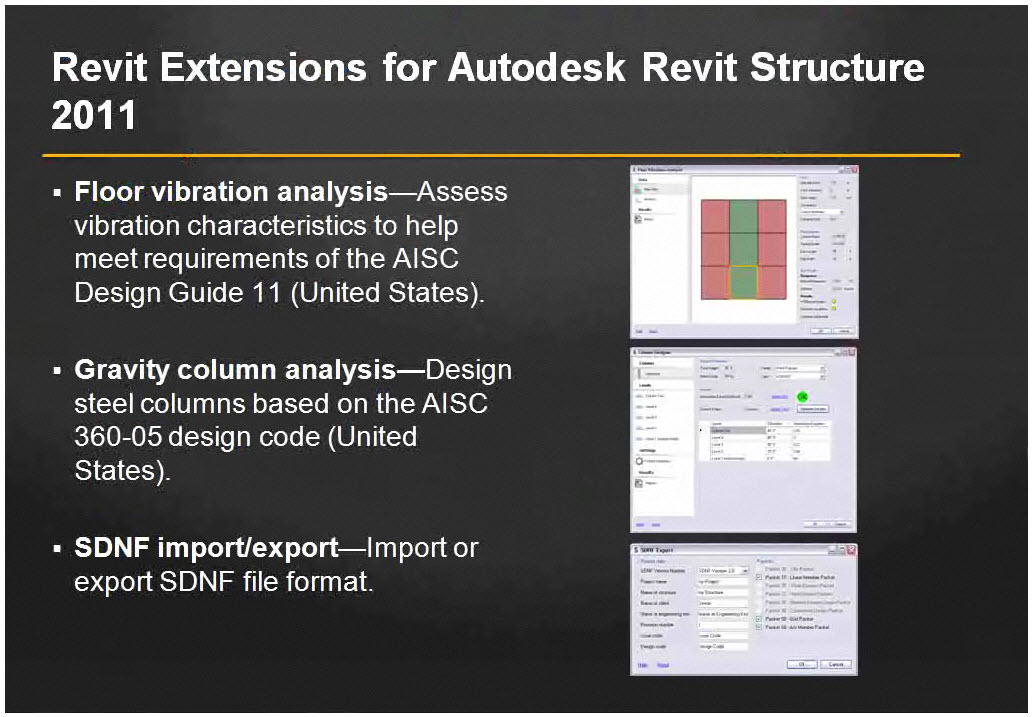
New Revit Extensions Coming Soon

Graphic Showing Upcoming Extensions

Floor Vibration
Gravity Column Analysis
SDNF import/Export (Steel Detailing Nuetral Format)?

Also includes Revit Server - Allows people in multiple locations to work off a single Revit file. Big hole possibly filled here

Dropbox

Ok, everybody I work with hears my Dropbox stories, but I don't think they feel me on it.  Im a geeky computer guy and want all my shit to work right and Im always looking for a shortcut to do anything.  Is that good or bad, probably both, but it's my search for zen. Im a cheapass and this solution only cost me $10 a month for 50 GB, they will give you 250 MB free.

How does that tie into Revit? Im glad you asked.  This is why I think Dropbox is excellent for people who work with large files (REVIT TIE-IN) over multiple computers and/or multiple locations. It also has some other key benefits as well.
  • 1 file.  Simple as that.  I open the same file, located locally on my computer (My Dropbox folder) across 4 computers at 2 locations.  No overwriting, No Synchronization
  • Like I said, it's located on your hard drive, therefore it's fast.  You can't work in Revit off of a file thats located on an off site server, the time it takes to save would be huge.
  • Any of you familiar with Getting Things Done methods will appreciate this.  Basically I catch a lot of information everyday; So the easier I can digest that information in an orderly manner, the faster I am and better orgainized I am.
    • For example. I save all info I get from emails at home or work or somewhere else (on my phone) to the same folder.  It all goes in 1 organized place.
  • Backup -  Im lazy and don't backup my files enough.  Well, Dropbox takes care of that.  Your files are also stored online and can be accessed from anywhere.
  • Phone Access - I can access my Dropbox from my Blackberry now.  I can access any files or send anyone a link to anyfile in my dropbox.  
    • Today I sent a coworker a 20 MB Revit file with my phone, and there was 0 uploading or downloading to my phone, only opening or saving the file on his end.
  • I use a plug in called airdropper.  This allows you to send an email to someone which lets them directly upload a file up to 80 mb into your dropbox folder.
  • Synchronization.  There are lots of options and lots of limitations here, its a free-for-all and lots of trial and error to make it work.
So there you go, I wade thru a lot of bullshit trying to simplify my life, which ironically usually complicates my life, but that's not the point.  This actually works like it should and that makes me happy.

I'll leave you on a happy note.......